Deviation Actions





Description
==================================================================
!!!NOTICE!!!
I don't recommend to use my config anymore! I no longer support it.
It only can be used with a very old version of foobar2000, namely v0.9.5.2. This is because the config is based on the "PanelsUI" component, which only supports this version of foobar. PanelsUI is no longer developed, and was a very inefficient and bad way of creating custom user interfaces to begin with. It's slow, buggy and consumes lots of memory.
I suggest you to download the latest version of foobar2000 instead, and use some of the newest, popular configs from the foobar category here on DeviantArt.
There are many-many better looking configs, with much more features than this ages old config of mine. I don't follow the foobar2000 config scene anymore, but It's even possible that you can find a config that can be configured to look very similar to AvAorange++.
I took down the downloadable zip file. If you absolutely need it send me a message.
==================================================================
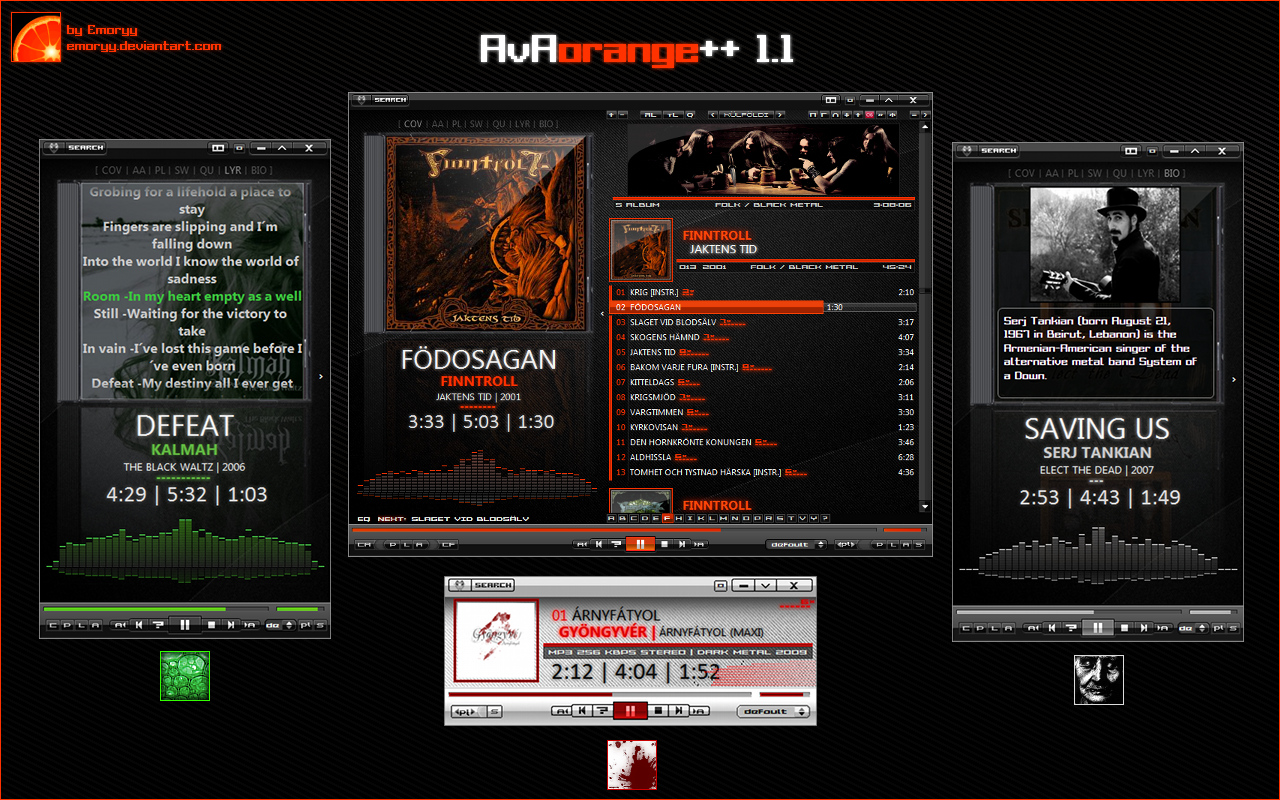
AvAorange++ 1.1
heavy modification of dawxxx666's FooAvA 1.05 foobar2000 config
PanelsUI config, so not compatible with versions of foobar2000 newer than v0.9.5.2
you can get necessary version here:
www.filehippo.com/download_foo…
required fonts, components included
some of my artist group header pictures for the playlist:
emoryy.deviantart.com/art/Arti…
copy them to %yourfoobardirectory%Artiststripe folder
read the README.TXT in the zip
///
///CHANGES IN 1.1
///
- 4 Color themes
- You can set the panels width ratio from a drop down menu
- You can save default window sizes (separated for normal, and mini mode)
- Rating set and display
- play mode dropdown menu
- Previous and Next Album buttons
- automatic title text width for main "now playing" panel
- Biography panel at mini panels
- new playlist toolbar button images, and some new buttons (if you have foo_lastfm_radio component, "add radio" button shows up)
There will be no more releases for PanelsUI.
Foobar icon by Active Thoughts activethoughts.deviantart.com/…
Emoryy